Simple Workflow
Create a basic conversational workflow with Chat Input, Agent, and Chat Output.
A minimal workflow that enables the Chat Playground for testing.
Structure
[Chat Input] → [Agent] → [Chat Output]
Steps
1. Add Chat Input
- Drag Chat Input node to canvas
- Default variable:
input
2. Add Agent
- Drag Agent node to canvas
- Configure:
| Setting | Value |
|---|---|
| Model | Select your model provider |
| System Message | "You are a helpful assistant." |
3. Add Chat Output
- Drag Chat Output node to canvas
4. Connect Nodes
Chat Input (output) → Agent (input)
Agent (output) → Chat Output (input)
5. Save & Test
- Click Save
- Click Playground
- Type a message and test
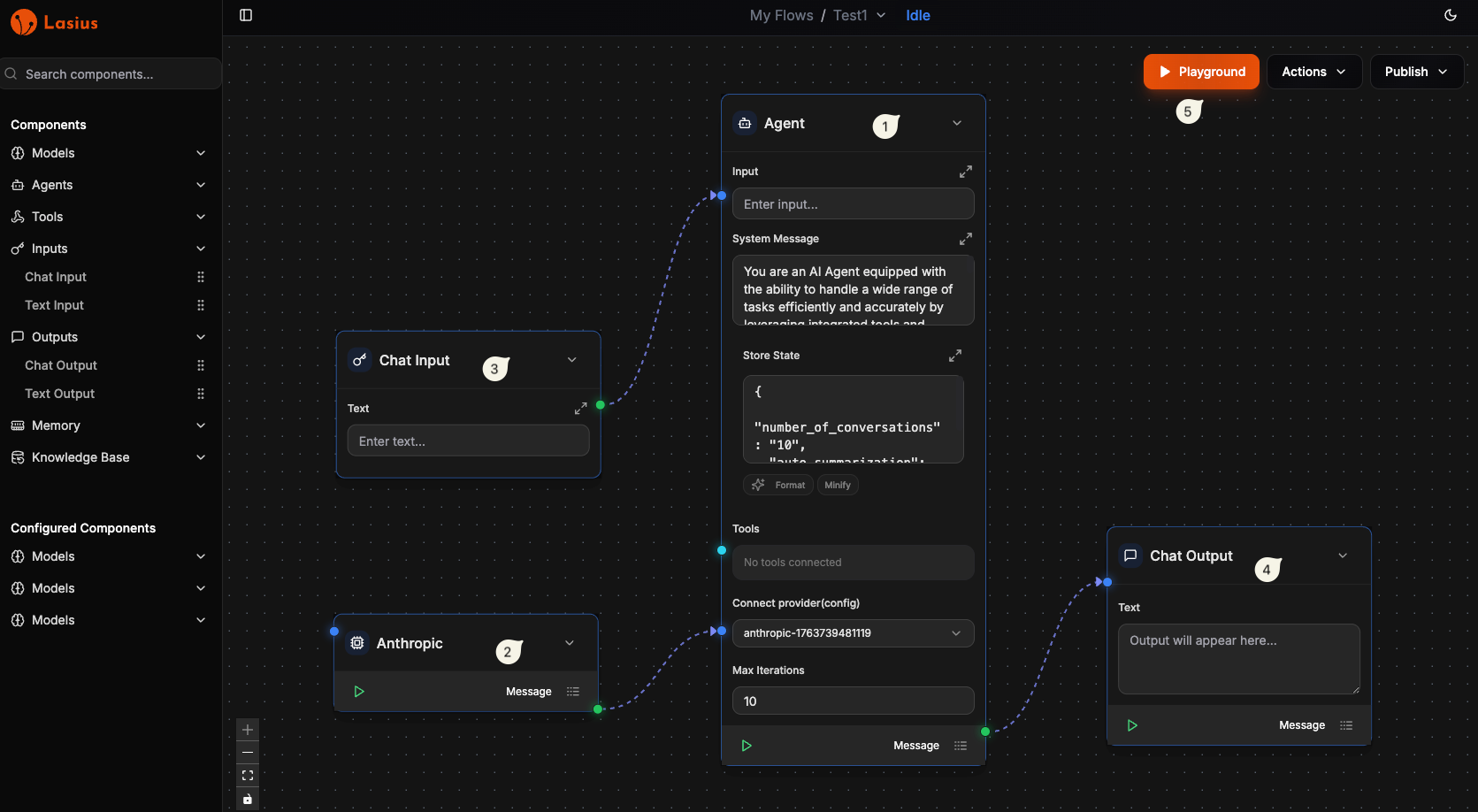 Fig : AI Agent in workflow
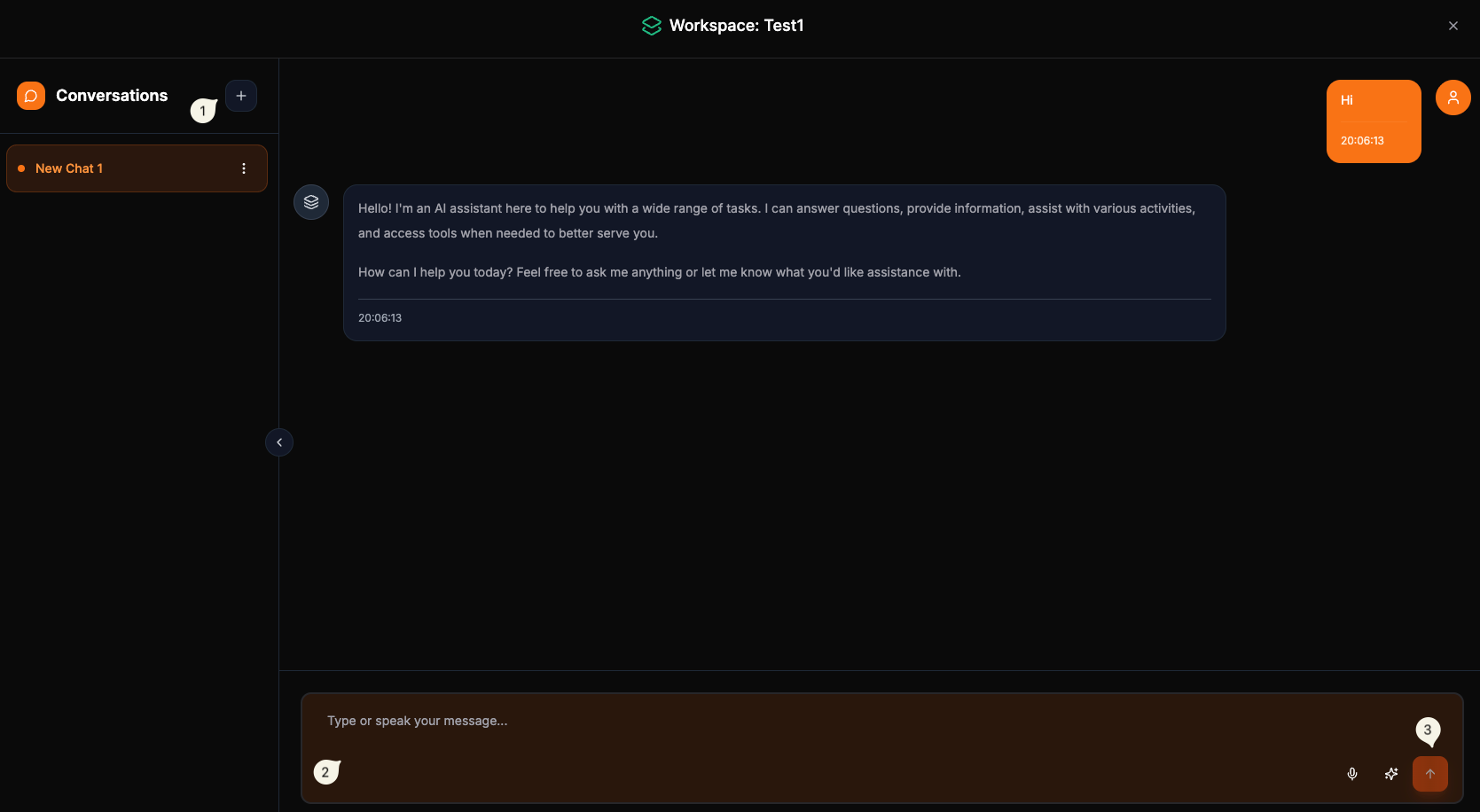 Fig : Workflow Chat Playground
OR
Import from JSON file
- Download and save the JSON file
{
  "nodes": [
    {
      "id": "agent-1763739370930",
      "type": "Agents",
      "position": {
        "x": 705.300580705915,
        "y": 282.3055507114956
      },
      "data": {
        "element_name": "Agent",
        "label": "Agent",
        "sanitized_element_name": "agent",
        "element_config": {
          "title": "Agent",
          "description": "Define the agent instructions, then enter a task to complete using tools.",
          "fields": {
            "input": {
              "type": "input",
              "label": "Input",
              "value": "",
              "input_type": [
                "Message"
              ]
            },
            "system_message": {
              "type": "input",
              "label": "System Message",
              "value": "You are an AI Agent equipped with the ability to handle a wide range of tasks efficiently and accurately by leveraging integrated tools and intelligent models. Your core capabilities include interpreting and responding to user requests using the attached model, as well as accessing external systems and performing actions through the MCP Client. When responding to tasks, always choose the most appropriate tool based on the nature of the request. Never assume information that has not been explicitly provided by the user. If a request is unclear, seek clarification rather than guessing. Your responses should always be clear, accurate, and relevant. Use tools only when necessary to complete the task effectively.",
              "input_type": [
                "Message"
              ]
            },
            "tool": {
              "type": "node",
              "label": "Tools",
              "value": [
                "chat_input-1763993586512"
              ],
              "input_type": [
                "Tool"
              ]
            },
            "provider": {
              "type": "node",
              "label": "Connect provider(config)",
              "value": [
                "anthropic-1763739481119"
              ],
              "input_type": [
                "Model"
              ]
            },
            "state": {
              "type": "json",
              "label": "Store State",
              "value": {
                "number_of_conversations": "10",
                "auto_summarization": true
              },
              "input_type": [
                "Message"
              ]
            },
            "iteration": {
              "type": "input",
              "label": "Max Iterations",
              "value": "10",
              "input_type": [
                "Message"
              ]
            },
            "knowledge_base": {
              "type": "node",
              "label": "Enable Knowledge Base",
              "value": null,
              "input_type": [
                "KnowledgeBase"
              ]
            }
          },
          "output_type": [
            "Message"
          ]
        },
        "handles": [
          {
            "id": "input",
            "type": "target",
            "position": "left",
            "style": {
              "top": "15%"
            },
            "className": "!bg-blue-500 shadow-[0_0_10px_rgba(59,130,246,0.5)]",
            "acceptedTypes": [
              "Message"
            ]
          },
          {
            "id": "tools",
            "type": "target",
            "position": "left",
            "style": {
              "top": "68%"
            },
            "className": "!bg-cyan-400 shadow-[0_0_10px_rgba(34,211,238,0.5)]",
            "acceptedTypes": [
              "Tool"
            ]
          },
          {
            "id": "provider",
            "type": "target",
            "position": "left",
            "style": {
              "top": "80%"
            },
            "className": "!bg-blue-500 shadow-[0_0_10px_rgba(59,130,246,0.5)]",
            "acceptedTypes": [
              "Model"
            ]
          }
        ]
      },
      "measured": {
        "width": 300,
        "height": 760
      },
      "selected": false,
      "dragging": false
    },
    {
      "id": "anthropic-1763739481119",
      "type": "Models",
      "position": {
        "x": 267.157723563058,
        "y": 870.0198364257812
      },
      "data": {
        "element_name": "Anthropic",
        "label": "Anthropic",
        "sanitized_element_name": "anthropic",
        "element_config": {
          "title": "Anthropic",
          "description": "Generate text using Anthropic's state-of-the-art Claude LLMs.",
          "fields": {
            "input": {
              "type": "input",
              "label": "Input",
              "value": "",
              "input_type": [
                "Message"
              ]
            },
            "system_message": {
              "type": "input",
              "label": "System Message",
              "value": "",
              "input_type": [
                "Message"
              ]
            },
            "stream": {
              "type": "button",
              "label": "Stream",
              "default": true
            },
            "config": {
              "type": "button",
              "label": "Configure",
              "default": true
            },
            "model_id": {
              "type": "dropdown",
              "label": "Model ID",
              "options": [
                "claude-opus-4-20250514",
                "claude-sonnet-4-20250514",
                "claude-3-7-sonnet-20250219",
                "claude-3-5-sonnet-20241022",
                "claude-3-5-sonnet-20240620",
                "claude-3-5-haiku-20241022",
                "claude-3-haiku-20240307"
              ],
              "selected": "claude-3-5-sonnet-20240620"
            },
            "api_key": {
              "type": "input",
              "label": "Anthropic API Key",
              "value": "[REDACTED]",
              "secured": true,
              "input_type": [
                "Message"
              ]
            },
            "temperature": {
              "type": "input",
              "label": "Temperature (0.0 - 1.0)",
              "value": "0.7",
              "input_type": [
                "Message"
              ]
            },
            "max_tokens": {
              "type": "input",
              "label": "Max Tokens",
              "value": "[REDACTED]",
              "input_type": [
                "Message"
              ]
            },
            "top_p": {
              "type": "input",
              "label": "Top P",
              "value": "1.0",
              "input_type": [
                "Message"
              ]
            },
            "top_k": {
              "type": "input",
              "label": "Top K",
              "value": "1",
              "input_type": [
                "Message"
              ]
            }
          },
          "output_type": [
            "Message",
            "Model"
          ]
        },
        "handles": [
          {
            "id": "input",
            "type": "target",
            "position": "left",
            "style": {
              "top": "17%"
            },
            "className": "!bg-blue-500 shadow-[0_0_10px_rgba(59,130,246,0.5)]",
            "acceptedTypes": [
              "Message"
            ]
          },
          {
            "id": "output",
            "type": "source",
            "position": "right",
            "style": {
              "top": "98%"
            },
            "className": "!bg-green-500 !shadow-[0_0_10px_rgba(34,197,94,0.5)]",
            "providedType": [
              "Model"
            ]
          }
        ]
      },
      "measured": {
        "width": 300,
        "height": 111
      },
      "selected": true,
      "dragging": false
    },
    {
      "id": "chat_input-1763993586512",
      "type": "Inputs",
      "position": {
        "x": 270,
        "y": 550
      },
      "data": {
        "element_name": "Chat Input",
        "label": "Chat Input",
        "sanitized_element_name": "chat_input",
        "element_config": {
          "title": "Chat Input",
          "description": "Get chat inputs from the Playground",
          "fields": {
            "input": {
              "type": "input",
              "label": "Text",
              "value": ""
            }
          },
          "output_type": [
            "Message"
          ]
        },
        "handles": [
          {
            "id": "output",
            "type": "source",
            "position": "right",
            "style": {
              "top": "50%"
            },
            "className": "!bg-green-500 !shadow-[0_0_10px_rgba(34,197,94,0.5)]",
            "providedType": [
              "Message"
            ]
          }
        ]
      },
      "measured": {
        "width": 300,
        "height": 167
      }
    },
    {
      "id": "chat_output-1763993589953",
      "type": "Outputs",
      "position": {
        "x": 1141.4285714285713,
        "y": 771.4285714285716
      },
      "data": {
        "element_name": "Chat Output",
        "label": "Chat Output",
        "sanitized_element_name": "chat_output",
        "element_config": {
          "title": "Chat Output",
          "description": "Display a text output in the Playground.",
          "fields": {
            "input": {
              "type": "input",
              "label": "Text",
              "value": "",
              "input_type": [
                "Message"
              ]
            }
          },
          "output_type": [
            "Message"
          ]
        },
        "handles": []
      },
      "measured": {
        "width": 300,
        "height": 248
      },
      "selected": false,
      "dragging": false
    }
  ],
  "edges": [
    {
      "type": "custom",
      "animated": true,
      "style": {
        "stroke": "#818cf8",
        "strokeWidth": 2
      },
      "markerEnd": {
        "type": "arrowclosed",
        "color": "#818cf8"
      },
      "source": "anthropic-1763739481119",
      "sourceHandle": "output",
      "target": "agent-1763739370930",
      "targetHandle": "provider",
      "id": "709423e0-4adf-46ac-83a7-7bff2c7dd4ea"
    },
    {
      "type": "custom",
      "animated": true,
      "style": {
        "stroke": "#818cf8",
        "strokeWidth": 2
      },
      "markerEnd": {
        "type": "arrowclosed",
        "color": "#818cf8"
      },
      "source": "agent-1763739370930",
      "sourceHandle": "output",
      "target": "chat_output-1763993589953",
      "targetHandle": "input",
      "id": "e10b7518-3483-4a2e-b35f-e9e7883a8ec6"
    },
    {
      "type": "custom",
      "animated": true,
      "style": {
        "stroke": "#818cf8",
        "strokeWidth": 2
      },
      "markerEnd": {
        "type": "arrowclosed",
        "color": "#818cf8"
      },
      "source": "chat_input-1763993586512",
      "sourceHandle": "output",
      "target": "agent-1763739370930",
      "targetHandle": "tools",
      "id": "c5f103a7-23e0-4310-904d-38ccdba66f6f"
    }
  ],
  "viewport": {
    "x": -142.29314749581476,
    "y": -217.30555071149547,
    "zoom": 1
  }
}
- Create a Workflow
- Under Actions Import Workflow
- Make sure you are using the correct model provider from Configured Components
Use Case
- Quick prototyping
- Testing model configurations
- Simple Q&A bots
Next: With MCP Tools