Connections
Manage authenticated connections and profiles for MCP servers.
Connections & Profiles shows all your authenticated connections to external services, organized by profile. This is where you can view, manage, and revoke access to MCP servers.
Navigate to Connections
- Open the sidebar menu
- Click Gateway to expand
- Select Connections
Understanding Connections
When you configure a provider and connect to an MCP server, a connection is created. Connections are grouped by profile (the provider configuration you used).
Provider Config → Profile → Connection to MCP Server
Connections View
The page displays connections grouped by profile:
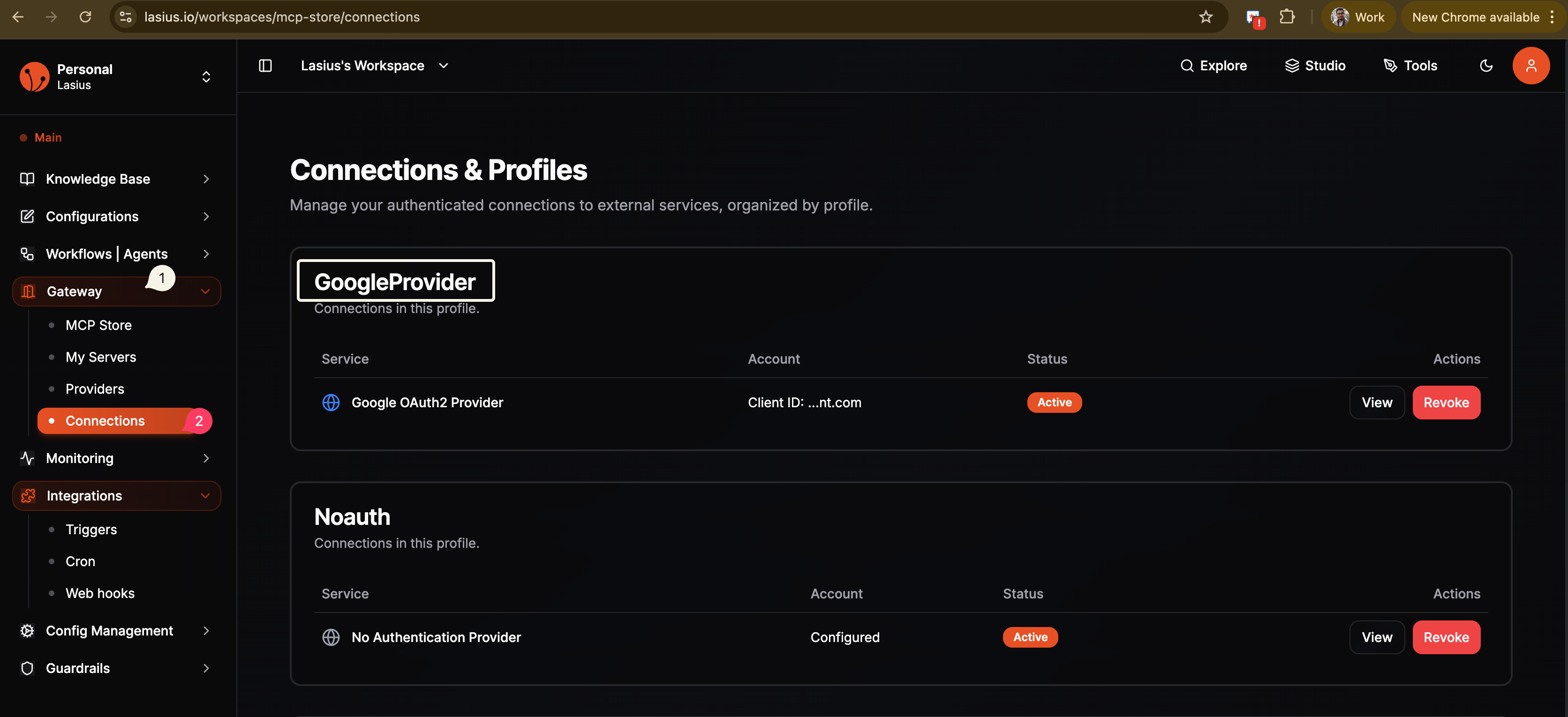 Fig : Configure Google Auth
Profile Card
Each profile shows:
- Profile Name (e.g., "Hubspot", "Noauth")
- Description: "Connections in this profile"
- Connections Table: List of services using this profile
Connection Details
| Column | Description |
|---|---|
| Service | The auth provider type used |
| Account | Configuration status |
| Status | Active, Inactive, or Error |
| Actions | View or Revoke |
Connection Statuses
| Status | Meaning |
|---|---|
| Active | Connection is working |
| Inactive | Connection disabled or expired |
| Error | Authentication failed |
Managing Connections
View Connection
- Click View on a connection
- See connection details and configuration
- Review which MCP servers use this connection
Revoke Connection
- Click Revoke on a connection
- Confirm the revocation
- The connection is removed
Note:
Revoking a connection will disconnect all MCP servers using that profile. They will stop working until you reconfigure.
Example Profiles
No Authentication Profile
Profile: Noauth
├── Service: No Authentication Provider
├── Account: Configured
└── Status: Active
Used for MCP servers that don't require authentication (Calculator, local servers).
API Key Profile
Profile: Hubspot
├── Service: API Key Authentication Provider
├── Account: Configured
└── Status: Active
Used for MCP servers requiring API key authentication.
OAuth Profile
Profile: Google
├── Service: Google OAuth2 Provider
├── Account: user@example.com
└── Status: Active
Used for Google services (Gsuite, Drive, etc.).
Troubleshooting
| Issue | Solution |
|---|---|
| Connection shows "Error" | Re-authenticate or check credentials |
| Connection shows "Inactive" | Token may have expired, re-authorize |
| MCP server stopped working | Check connection status here |
Best Practices
- Regular review: Periodically check connections are still active
- Remove unused: Revoke connections you no longer need
- Multiple profiles: Use separate profiles for dev/staging/production
- Monitor status: Watch for error statuses indicating auth issues
Next: View My Servers